Australia's most capable AI estimating platform

Quote it. Track it. Get paid.

AI-native construction job management software for Australian builders, trades & renovators. Estimate it, win it, run it on one platform.

14-day free trial•Cancel anytime•HIA Member #1398778

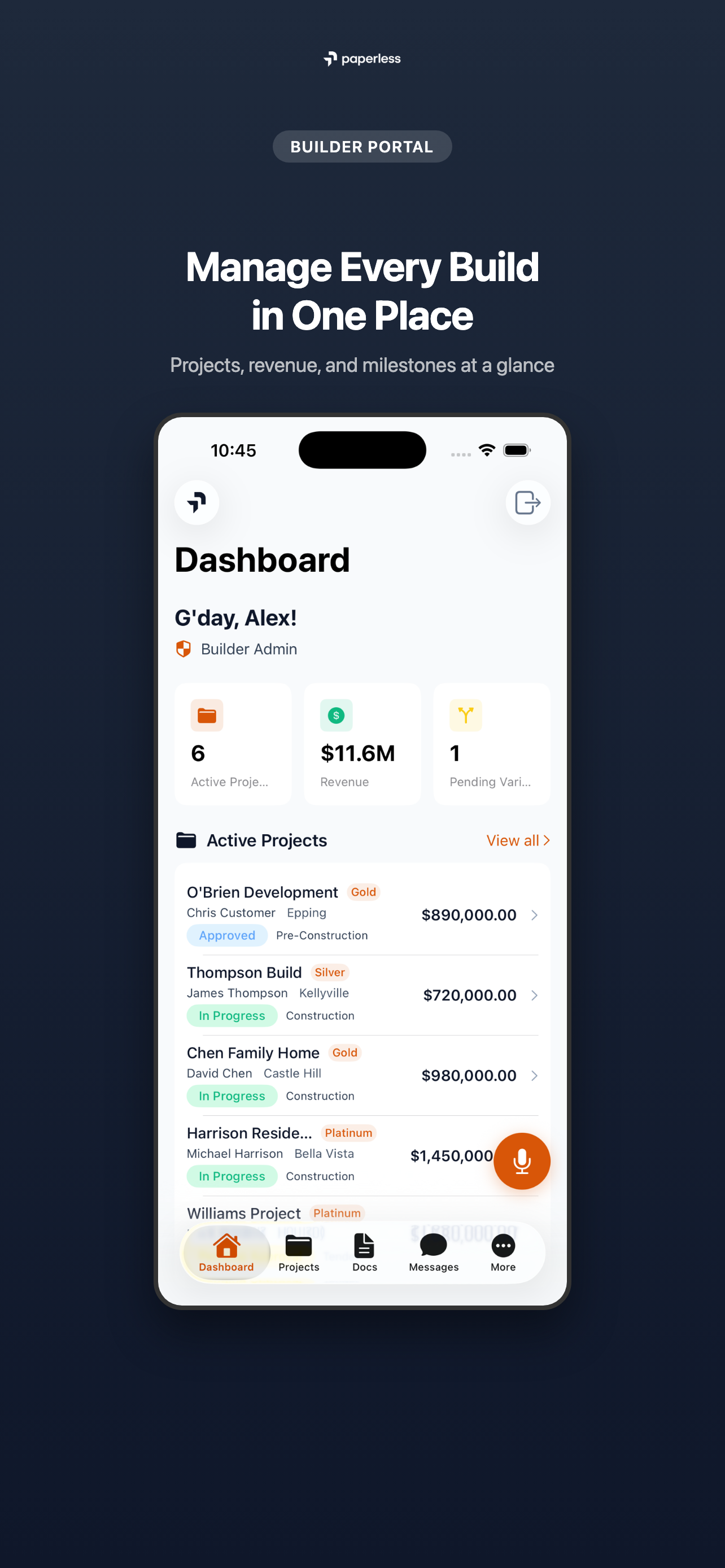
Now on iOS & Android — run your site from your pocket

AI-native construction job management software, built for Australian builders and trades

Build Paperless is Australia’s most capable AI estimating platform for builders and trades, and AI-native construction job management software built for the way Australian jobs run. AI estimating and takeoff from plans runs from the Builder module through to our sub-specialty trade modules, and millions of dollars in quotes are priced through it every week.

The estimate carries straight into the job: scheduling, HIA and MBA contracts, variations, progress claims, client portals and document storage on one platform, with state payment stages, HBCF tracking and Australian-hosted data built in. Made in Sydney for Australian builders and the trades they hire, replacing the spreadsheets, emails and WhatsApp groups that slow every build down.

  • Australian owned and run

    Cashara Pty Ltd trading as Build Paperless. ABN 92 684 673 836.

  • Your data stays in Australia

    Hosted in Sydney and encrypted with AES-256, at rest and in transit.

  • Handled under the Privacy Act

    Compliant with the Australian Privacy Principles, Privacy Act 1988.

  • Connected directly to Claude

    Ask Claude about your jobs, estimates and schedules in plain English, live from your Paperless data.

Build Paperless is job management software for Australian residential builders and the trades they hire. One platform brings AI-powered estimation, scheduling, job tracking, digital contracts, variations, progress claims, client portals, and document storage together, replacing the spreadsheets, emails, and WhatsApp groups that slow every build down. Trusted by builders and trades across every Australian state and territory.

Google Review

What builders and trades are saying

Review 1 of 4
Builder

We've been using Build Paperless at Living Homes NQ and it's been a great addition to our business. It's cut down our admin time, simplified documentation, and keeps everything consistent and easy to manage across all our projects.

The colour selection process is a standout -- well laid out, easy for clients to understand, and it takes a lot of the guesswork out of selections. It makes the whole experience smoother for both our team and our clients.

The client portal and subcontractor portal are also excellent, keeping communication clear and everyone on the same page throughout the build.

The AI features are a real advantage day-to-day, helping automate tasks, reduce errors, and speed up workflows across the business.

Less time on paperwork, more time focusing on building and delivering for our clients.

Living Homes NQ logo

Paul Zammit

Director, Living Homes NQ

Everything you need to run your builds

Less time on admin. More time on site. Here's how each part works.

AI estimation

Upload your plans and get a priced estimate you can review, edit and send as a quote.

How it works

  1. 1Upload your plans as PDF, PNG or JPG.
  2. 2The AI reads rooms, walls, doors and windows into a takeoff. You review it and redraw anything that is off.
  3. 3Set margin and contingency. It prices from your own rate library, then you turn it into a quote.

A priced estimate from the plans, checked by you before it goes to the client.

Learn more →
A priced estimate with categories and line items in the Build Paperless builder portal

Digital variations

Price a variation, send it, and get it approved with a signature and a record.

How it works

  1. 1Build the variation with its line items and send it to the client.
  2. 2The client opens the link and confirms with a one-time code sent to their email.
  3. 3They approve with their name and signature. The signed record is saved and the project budget updates.

Approved variations in writing, flowing straight into the budget and your next progress claim.

Learn more →
1Build and send the variation
2Client confirms with an emailed code
3Signed record saved, budget updated

Project management

Milestones, a drag-and-drop schedule and budgets, all linked to the job.

How it works

  1. 1Set up milestones, starting from a template if you like.
  2. 2Drag tasks on the Gantt, link dependencies and switch on the critical path.
  3. 3The budget tab rolls up the contract, invoices, variations and costs for the job.

One place to see where a job is up to and where the money is going.

Learn more →
Project milestones and schedule in the Build Paperless builder portal

Progress claims, payments and accounting

Raise claims from your contract stages, then send them to Xero, MYOB, QuickBooks or Odoo.

How it works

  1. 1Apply an HIA, MBA or custom claim template, or claim by percentage of work done.
  2. 2Claims go out as tax invoices with retention and GST worked out.
  3. 3They sync to your accounting software, and payments come back the same way.

Claims, invoices and payments that match your books without retyping.

Learn more →
Payments and progress claims in the Build Paperless builder portal

Client and supplier portals

Clients and suppliers get their own login to the parts of the job that concern them.

How it works

  1. 1Invite your client. They sign in with their own login.
  2. 2They see progress, photos, documents, variations, payments and messages. Preview exactly what they see first.
  3. 3Suppliers get their own portal for purchase orders, quotes and messages.

Clients check progress themselves instead of ringing you for an update.

Learn more →
1Invite your client
2They see progress, photos and payments
3Suppliers get their own portal

Email management

Connect Gmail or Outlook and your project emails get matched to the right job.

How it works

  1. 1Connect your Gmail or Outlook mailbox.
  2. 2Each new email is read and categorised by AI.
  3. 3It is matched to a job by project number or site address. Reassign it with one click if it lands wrong.

Emails and attachments sit with the job they belong to.

Learn more →
1Connect Gmail or Outlook
2AI reads and categorises each email
3Matched to the job, reassign if needed

Slide 1 of 6: AI estimation

Connected to the systems Australian builders actually use

Take payments with Stripe, plus ABN lookups, state licence checks, Xero, MYOB, QuickBooks and Odoo sync, and weather from the BOM. Swipe on to see what each one does for you.

HIA Member

HIA Member #1398778

Housing Industry Association — Australia's peak residential building body

ABR

Automated ABN verification via the Australian Business Register

NSW

NSW builder licence verification

QLD

QLD building licence verification via QBCC register

VIC

VIC practitioner accreditation verification

Stripe

Take deposits and invoice payments by card or bank debit, paid into your own account

X

Xero

Seamless accounting sync with Xero

MYOB

Sync contacts, invoices, bills and payments with MYOB Business

qb

QuickBooks

Two-way invoice and bill sync with QuickBooks Online

OO

Odoo

Two-way invoice, bill & payment sync with Odoo, tracked by project

BOM

Auto-fill site diary weather from the Bureau of Meteorology

Fill in company details from the Australian Business Register

Start typing a business name and pick the right match instead of keying in an ABN.

How it works

  1. 1In Company Info, type three or more letters of the business name.
  2. 2Build Paperless searches the Australian Business Register and shows up to five matches.
  3. 3Pick one and the business name and ABN fill in.

What you get

Correct ABNs on your quotes and invoices, without copying them from a website.

Available to Australian accounts. It fills in the name and ABN; it does not check GST registration.

Check licences against the state register

Keep your own licence and your trades’ licences checked against NSW, QLD and VIC registers.

How it works

  1. 1Add a licence number for your business, a trade or a crew member.
  2. 2Build Paperless checks it against NSW Fair Trading, the QBCC register or the Victorian register for that state.
  3. 3It is checked again each day, and you can re-check on demand.

What you get

See at a glance which licences are current, and which need attention.

NSW, QLD and VIC are checked automatically. For other states you get a link to the regulator.

Take deposits and invoice payments into your own Stripe account

Customers pay by card or bank debit, and the money goes to you, not through us.

How it works

  1. 1Connect your own Stripe account from Settings, Integrations.
  2. 2Set a deposit on a quote, or tick Request payment online on an invoice.
  3. 3The customer pays by card or bank debit. The payment shows as paid once Stripe confirms it.

What you get

Deposits and invoices paid online, settled to your account on your Stripe payout schedule.

Stripe payments is a paid add-on and is connected from trade accounts today. Bank debit takes a few business days to settle.

X

Keep Xero and your jobs in step

Invoices, progress claims, bills, purchase orders, payments and contacts sync with Xero.

How it works

  1. 1Connect to Xero and choose the Xero organisation.
  2. 2Pick your default accounts from your own chart of accounts.
  3. 3Sync runs every 15 minutes, with webhooks for changes, and job tracking categories carry through.

What you get

Your accountant sees the same invoices and bills, tied to the right job, without re-entry.

One accounting system can be connected at a time. Quotes come in from Xero, not out.

Sync contacts, invoices, bills and payments with MYOB Business

Your MYOB company file stays in step with your jobs, both ways.

How it works

  1. 1Connect with MYOB and choose your company file.
  2. 2Set default accounts. Contacts, invoices, bills and payments sync every 15 minutes.
  3. 3Sent invoices and progress claims go out to MYOB from a queue. Failures retry, then flag for review.

What you get

Progress claims and payments land in MYOB without being typed twice.

Australian accounts. One accounting system can be connected at a time.

qb

Two-way invoice and bill sync with QuickBooks Online

Invoices, bills, purchase orders and payments move between QuickBooks and your jobs.

How it works

  1. 1Connect to QuickBooks Online and set your default accounts.
  2. 2Invoices, purchase orders and payments sync both ways.
  3. 3Customers and your chart of accounts come across, so coding matches your books.

What you get

The books stay current while you work from the job.

Bills need QuickBooks Plus or Advanced. One accounting system can be connected at a time.

OO

Invoices, bills and payments with Odoo, tracked by project

Build Paperless stays your construction record while Odoo remains your ledger.

How it works

  1. 1Enter your Odoo address, database, login and API key, then choose the company.
  2. 2Invoices, bills and payments sync on a 15-minute cycle.
  3. 3Each line carries the project’s analytic account, so Odoo reports cost by job.

What you get

Project-by-project cost in Odoo, without keying job codes by hand.

We support Odoo versions 17 and 18. One accounting system can be connected at a time.

Put the weather on the job record

Log weather in your site diary and turn weather delays into formal notices.

How it works

  1. 1In the site diary or a weather event, press Auto-fill from BOM to pull the Bureau of Meteorology conditions for the site.
  2. 2A daily forecast check can draft a weather event when rain, wind or heat is coming.
  3. 3You confirm it and send a Delay Notice. Sending it moves the schedule dates, and you can undo that.

What you get

A dated weather record behind every delay claim.

BOM auto-fill covers today and future dates. Alerts and the 7-day forecast use Open-Meteo. A person sends every delay notice.

Slide 1 of 9: Overview

Every state and territory

Built for every state's rules, not a generic template

Progress claims, licence rules and contract terms change at every border. Build Paperless is set up around the way each state and territory works, so your estimates, claims and records match wherever you build.

NSW

New South Wales

NSW Fair Trading

Security of Payment Act 1999

Progress claim templates follow the Home Building Act payment stages, with HBCF certificate tracking and expiry reminders.

VIC

Victoria

Building and Plumbing Commission

Security of Payment Act 2002

Progress claim templates and insurance certificate tracking, organised around the BPC (formerly the VBA) and the Domestic Building Contracts Act.

QLD

Queensland

QBCC

BIF Act 2017

Progress claim templates and document management, organised around the QBCC and the Building Industry Fairness payment regime.

WA

Western Australia

Building Commission

Security of Payment Act 2021

Progress claim templates and insurance certificate tracking, organised around the 2021 security of payment regime in WA.

SA

South Australia

Consumer and Business Services

Security of Payment Act 2009

Progress claims and payment schedules, organised around the Consumer and Business Services building rules.

TAS

Tasmania

CBOS

Security of Payment Act 2009

Progress claims and document management, organised around the Consumer, Building and Occupational Services rules.

ACT

Australian Capital Territory

Access Canberra

Security of Payment Act 2009

Progress claims and payment schedules, organised around the Access Canberra building rules.

NT

Northern Territory

Building Practitioners Board

Construction Contracts Act 2004

Payment claims and document management, organised around the Construction Contracts (Security of Payments) framework.

On top of each state's rules, the AI estimator applies the national ones too: the National Construction Code, NCC climate zones and bushfire (BAL) provisions everywhere, plus termite protection where your region needs it.

This is general guidance, not legal advice. Build Paperless helps you manage progress claims, your own contracts and project records the way each state expects. It does not provide contract documents or replace your own licensing and insurance obligations. Learn more

What it costs

Priced by your office size. Start on Solo, and add admins as you grow into Team and Company — we adjust your bill as your team does.

Solo

When it is just you in the office

$99/mo

ex GST · one admin seat

  • The whole platform, no feature gating
  • Unlimited projects & customers
  • AI estimation, quotes & invoicing
  • Add crew & site foreman anytime
Most popular

Team

A crew and someone on the books

$79/admin seat/mo

ex GST · from $158/mo (2 to 4 admins)

  • Everything in Solo
  • Add admins as your office grows
  • Job profitability, WIP & cashflow
  • Client portal & homeowner comms

All plans include a 14-day free trial. Cancel anytime.

See full plan comparison →

Frequently asked questions

Now on iOS & Android

Your site office. In your pocket.

Log diary entries, upload progress photos, and check RFIs while you're walking the slab. No laptop, no tent over the Wi-Fi hotspot, no paperwork to type up when you get back to the office.

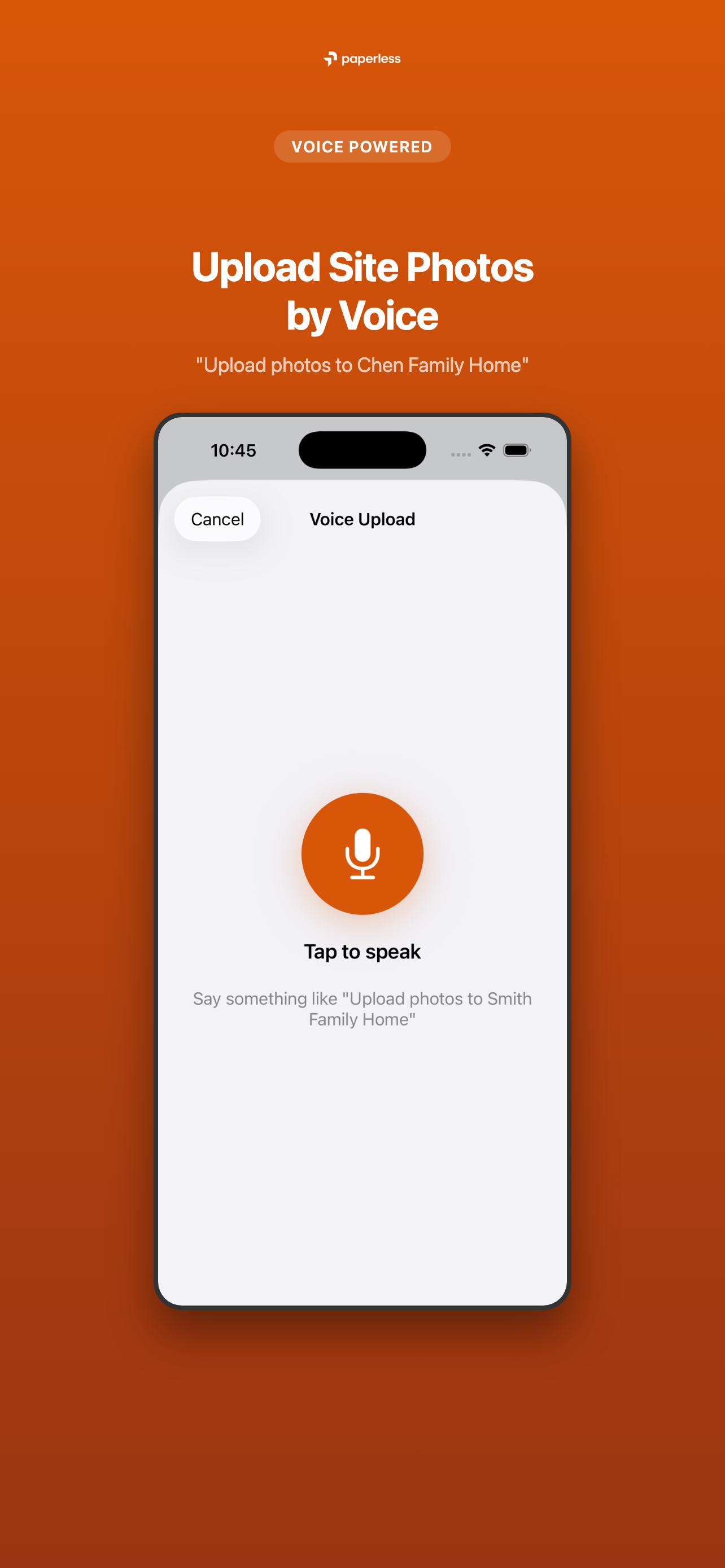
Voice Paperless AI

Hold the mic, say it plainly, done. Our AI parses trade-shorthand into structured actions — no menus, no typing.

  • “Upload today's photos to Martinez Home”
  • “Show me photos from the Thompson build last week”
  • “Log a weather delay — heavy rain, site's wet”
  • Site diary, photos, defects — all from the field
  • Photos tagged to the right project automatically
  • Same login, same data, same Australian servers

Two apps, one login

Build Paperless app icon

Build Paperless

The main field app

Site diary, photos, RFIs and Voice AI. Run the whole job from your pocket.

Paperless SnaggIt app icon

Paperless SnaggIt

Defect-capture companion

Capture and close out site defects fast. Syncs to the same Build Paperless account.

iOS 17+ or Android 9+ · Free with any Build Paperless plan, including Founding Builders
Build Paperless iOS app showing the builder dashboard

More time on site. Fewer evenings on admin.

From $99/mo. 14 days free. Cancel anytime.

Join the community

Follow Build Paperless for tips, updates, and builder stories